Best LinkedIn Automation Tools in 2026: What to Use Without Risking Your Account

LinkedIn automation tools are everywhere now. Some help you send connection requests. Some manage follow-ups. Some scrape leads from Sales Navigator. Some give you a shared inbox for replies. On the surface, most of them look similar: campaigns, sequences, templates, analytics, and integrations.
But in 2026, that is not the real buying question anymore.
The real question is this:
Can you run LinkedIn outreach without putting your main LinkedIn account at risk?
That is where most LinkedIn automation tool comparisons fall short. They compare features, pricing, and inboxes, but they rarely talk honestly about account restrictions, pending invitations, reply behavior, daily limits, or what happens when the founder's personal LinkedIn profile gets flagged mid-campaign.
If you are evaluating LinkedIn outreach software this year, you need to think beyond automation. You need to think about account safety, delivery model, reply handling, and whether the tool is helping you build a sustainable outbound system or just send more messages faster.
This guide breaks down the main categories of LinkedIn automation tools, what they are good for, where they create risk, and why BriskReach is worth considering if account safety matters as much as campaign volume.
What LinkedIn Automation Tools Usually Do
Most LinkedIn automation tools are built around the same core workflow.
You upload or search for leads, create a campaign, write a connection request, add follow-up messages, set delays, and let the tool send outreach on your behalf. Some tools also add inbox management, team workspaces, CRM sync, analytics, A/B testing, or AI-generated message suggestions.
That can be useful if you are doing manual outreach and spending hours every week switching between tabs, checking replies, and remembering who needs a follow-up.
The common feature set usually includes:
- LinkedIn connection request automation
- Follow-up message sequences
- Lead import from Sales Navigator or CSV files
- Campaign scheduling
- Basic personalization fields
- Reply detection
- Shared inboxes
- Analytics and campaign reporting
- CRM integrations
- Team access and workspace controls
These features save time. They make outreach more organized. They help teams avoid the mess of running campaigns from spreadsheets.
But they do not automatically make outreach safe.
That distinction matters.
The Problem With Most LinkedIn Automation Software
Most LinkedIn automation tools were built to solve a scale problem.
They help you send more connection requests, follow-ups, and messages in less time. That sounds useful until the sending behavior starts looking unnatural.
LinkedIn does not only look at whether you are using a tool. It looks at behavior. If an account suddenly starts sending a high volume of connection requests, builds up too many pending invitations, sends repeated messages with similar wording, or keeps pushing follow-ups after someone has replied, the account starts to look automated.
That is where restrictions happen.
The problem is not always the software itself. The problem is that many tools make it too easy to run a campaign at a volume the account cannot safely support.
A founder with a real LinkedIn profile might think, “I will just send 80 requests per day for a few weeks.” But if that account has never behaved that way before, the sudden jump in activity creates risk. If acceptance rates are weak, pending requests pile up. If replies are low, the account looks like it is pushing unsolicited messages at scale.
Traditional automation tools often treat safety as a small feature.
A toggle for random delays. A daily limit field. Maybe a warmup mode.
That is not enough.
Safe LinkedIn outreach is not one setting. It is an operating system.
What Makes a LinkedIn Automation Tool Safer?
A safer LinkedIn outreach tool should not just ask, “How many messages do you want to send?”
It should help control how outreach behaves across the whole campaign.
The most important safety factors are:
Daily Sending Caps
A good tool should let you control how many connection requests or messages go out per account per day. More importantly, those caps should apply at the account level, not just the campaign level.
If you run three campaigns from one LinkedIn account, each campaign should not be allowed to send independently until the account goes over a safe daily volume.
Working Hours
Messages should go out during normal business hours. Outreach sent at strange times can look automated, especially when the recipient is in a different timezone.
Randomized Delays
Real humans do not send messages every exact 60 seconds. A safer tool should use natural spacing between actions instead of predictable intervals.
Warmup Behavior
A new or inactive account should not start with high daily volume. Sending should increase gradually based on account age, activity, and campaign performance.
Reply-Aware Pausing
When someone replies, automation should stop for that conversation.
This is one of the most important safety and quality features. If a prospect responds and the tool still sends the next automated follow-up, the conversation feels broken. It also makes the sender look careless.
Pending Request Management
Too many unanswered connection requests can become a problem. A safer system should help monitor and manage old pending invitations instead of blindly sending more.
Clear Inbox Control
If replies are scattered across multiple accounts, campaigns, and tabs, teams miss opportunities. A shared inbox helps, but only if it also shows campaign context and lets the team respond manually when needed.
The Best LinkedIn Automation Tools Are Not Always the Highest-Volume Tools
A common mistake is choosing a LinkedIn automation tool based on how much volume it can push.
That is the wrong metric.
The better question is:
How much outreach can this system run while still keeping the sending behavior believable and controlled?
For some teams, a standard LinkedIn automation tool is enough. If you are doing light outreach from one established account, sending a small number of carefully targeted connection requests, and manually handling replies, you may not need anything complex.
But if LinkedIn is a serious acquisition channel, the risk changes.
You need a better system if:
- Your founder's LinkedIn account is too valuable to risk
- You need to run outreach across multiple audience segments
- You have a sales team managing several campaigns
- You want one inbox for replies
- You need daily caps and pacing controls
- You are worried about account restrictions
- You do not want your personal profile to be the main sending asset
That is where BriskReach fits differently from traditional automation tools.
BriskReach: A Safer LinkedIn Outreach System, Not Just Another Automation Tool
BriskReach is built for teams that want LinkedIn outreach, but do not want to build the entire system around risking one personal LinkedIn account.
It supports two practical outreach modes.
The first is Bring Your Own LinkedIn Account. You connect your own LinkedIn profile and run campaigns with built-in safety controls around pacing, daily caps, working hours, and reply handling.
The second is BriskReach Reps. Instead of sending from your own LinkedIn account, you can use real contracted human Reps who run outreach from their own LinkedIn profiles. This matters because it changes the risk model completely. Your personal or founder LinkedIn account is no longer the only account carrying the outbound workload.
That is the key difference.
Most LinkedIn automation tools help you automate activity from an existing account. BriskReach helps you decide whether your own account should be used at all.
For teams that have already had accounts restricted, or teams that cannot afford to lose access to a founder profile, that distinction is important.
BriskReach BYO Account Mode
BriskReach's BYO mode is useful when you already have a LinkedIn account with real history, real connections, and a clear reason to send outreach from that profile.
In this mode, you still control the account and the network. BriskReach gives you the campaign layer around it.
That includes:
- Campaign creation
- Lead management
- Daily sending caps
- Working-hour controls
- Timezone-aware sending
- Reply-aware pause
- Inbox management
- Campaign tracking
The goal is not to push the highest possible number of messages. The goal is to keep outreach organized and controlled so the account does not suddenly behave like a bot.
This is best for founders, consultants, sales leaders, and small teams that want to use an existing LinkedIn profile carefully.
BriskReach Reps Mode
BriskReach Reps is the more interesting model for teams that want LinkedIn outreach but do not want their main account exposed to the campaign risk.
A Rep is a real human profile used to run outreach on your behalf. This gives teams a way to scale LinkedIn outbound without making the founder's personal account the center of the operation.
This is especially useful if:
- Your personal LinkedIn account is important for brand and networking
- You are testing a new outbound campaign and do not want to risk your main profile
- You need more sending capacity than one account can safely support
- You want a more operational approach to LinkedIn outreach
- You have already been restricted using traditional automation tools
Traditional automation tools usually ask, “Which account do you want to connect?”
BriskReach asks a better question:
Should this campaign run from your account, or should it run through a dedicated Rep instead?
That is a much safer way to think about LinkedIn outbound.
BriskReach vs Traditional LinkedIn Automation Tools
Here is the simplest way to compare them.
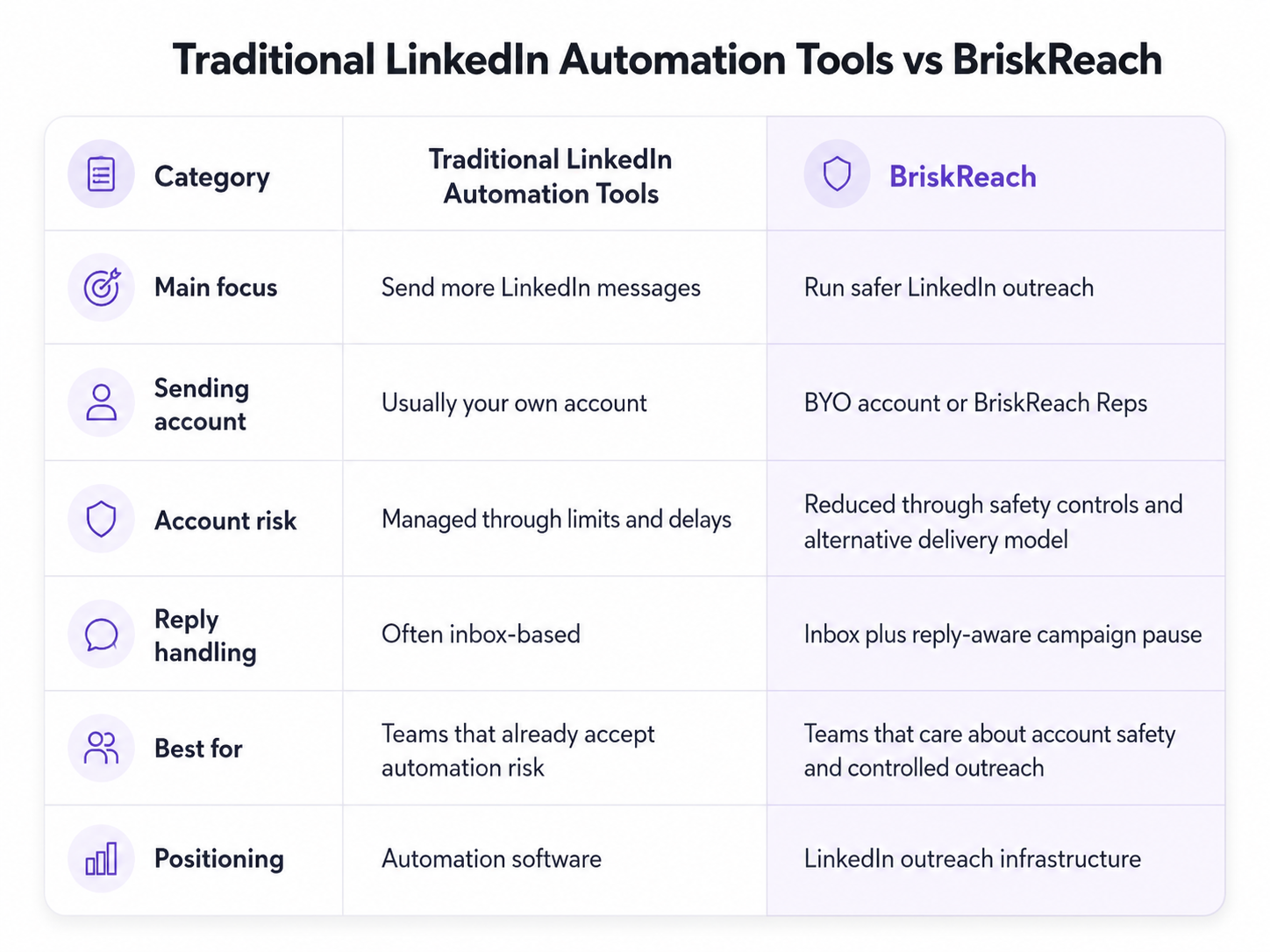
This does not mean every other tool is bad.
Some are strong for large sales teams. Some are good for creators. Some are good for scraping and enrichment. Some are useful if you already have a multi-account setup and understand the risks.
But if your main concern is protecting the LinkedIn account behind the outreach, BriskReach belongs in a different category.
How to Choose the Right LinkedIn Automation Tool
Before choosing a tool, answer these questions.
1. Are you willing to risk your main LinkedIn account?
If the answer is no, do not choose a tool only because it has sequences and analytics. Look for a system that gives you another way to send outreach.
This is where BriskReach Reps becomes relevant.
2. How much volume do you really need?
Many teams overestimate this. You do not need thousands of bad messages. You need enough well-targeted conversations to create pipeline.
A smaller, safer campaign often performs better than a high-volume campaign that gets ignored or restricted.
3. Will someone manually handle replies?
Automation should stop when a person replies. That is where real selling starts.
If your tool keeps sending follow-ups after a reply, it is not helping you build relationships. It is damaging them.
4. Can you control sending behavior per account?
Look for account-level daily caps, not just campaign-level limits. Otherwise, multiple campaigns can accidentally overload the same account.
5. Does the tool help you operate safely or just send faster?
This is the most important question.
A good LinkedIn outreach tool should help your team think about pacing, account health, reply quality, and campaign control. If the product is only designed around more volume, be careful.
When a Normal LinkedIn Automation Tool Is Enough
A traditional LinkedIn automation tool may be enough if you are doing very light outreach.
For example, you may be fine with a standard tool if:
- You send low daily volume
- You already know LinkedIn's limits
- You manually review replies
- You are not using your founder's most important account
- You can afford to pause if the account gets restricted
- LinkedIn is not your main acquisition channel
In that case, a simple automation workflow may save time without adding too much operational complexity.
But once LinkedIn becomes a serious sales channel, the risk becomes more expensive.
At that point, the tool should not just help you send. It should help you protect the system that sends.
When BriskReach Makes More Sense
BriskReach makes more sense when account safety is part of the buying decision.
It is a strong fit for:
- B2B founders running outbound from LinkedIn
- Agencies managing LinkedIn campaigns for clients
- Sales teams that need a clean inbox and campaign controls
- Startups testing LinkedIn as an acquisition channel
- Teams that have already dealt with account restrictions
- Companies that do not want to use the founder's account for all outreach
The main reason to choose BriskReach is not that it has a campaign builder or inbox. Those are useful, but many tools have them.
The main reason is the operating model.
You can use your own LinkedIn account with safety controls, or you can use Reps when you do not want your own profile to carry the risk.
That gives BriskReach a clearer position in the market:
LinkedIn outreach without putting your real account at the center of the risk.
Final Thoughts
The LinkedIn automation market is crowded because the surface-level problem is obvious: manual outreach takes too much time.
But the deeper problem is not time.
The deeper problem is risk.
If you automate carelessly, you can lose access to the account that your network, credibility, and pipeline depend on. That is why choosing a LinkedIn automation tool in 2026 should not be only about templates, integrations, or how many messages you can send.
It should be about the outreach system you are building.
If you only need light automation, a standard LinkedIn automation tool may be enough. But if LinkedIn is an important sales channel and account safety matters, BriskReach is the better category to evaluate: a safer LinkedIn outreach system with BYO account controls, real Reps, campaign management, and one clean inbox for replies.
The best LinkedIn automation tool is not the one that sends the most.
It is the one that helps you create conversations without burning the account behind them.